


Go back to Blog


Jennifer Edidiong
Marketing
10 min read
Share to
How to Read an AML Screening Result and Decide What to Do Next

An AML screening result comes back as a Potential Match with a middling similarity score. The customer is waiting, your review queue is getting longer, and all you have in front of you is a number and a label. Do you clear the result or escalate it?
This is a decision compliance teams face when reviewing AML screening results. Clearing a genuine match could expose your institution to compliance and regulatory risks. Escalating an unrelated match could delay onboarding and cost you a legitimate customer. Both outcomes have consequences, but the screening result alone does not tell you which decision to make.
To review a hit properly, you need to understand what each part of the result tells you, how to interpret the score, and what additional checks to carry out. This article walks through five common screening scenarios involving sanctions, PEPs and adverse media to help you understand what to look for and what to do next.
What Is in a Result

An AML screening result contains several details that help you assess a potential match.
Here's what each one tells you:
- Name and aliases: The name identifies the person or organisation returned by the search. Aliases are other names associated with that entry. A customer might have a different name spelling from the one on a watchlist but still appear under an alternative name.
- Entity type: This tells you whether the entry refers to an individual or an organisation. Check this before proceeding. A match involving a business with a similar name to an individual is not necessarily relevant to that customer's screening.
- Match score: This indicates how closely the customer's submitted details resemble the information in the watchlist entry. It helps you assess the similarity between the two records.
- Category: This identifies the type of record returned, such as a sanctions list, politically exposed person (PEP) record, warning list or adverse media entry. The category helps you understand what kind of risk you need to investigate.
- Date of birth and country: These details help distinguish between people with similar names. Compare them with the customer's information to identify similarities or differences.
- Media articles: For adverse media results, review the article headline, publication source and date. These help you assess what the report concerns, how recent it is and whether it relates to your customer.
- Risk level: This gives an overall indication of the match's risk. It can also be updated by your team after reviewing the case.
The score is the part people misread most.
How to Read the Score
The match score indicates how closely a customer's information resembles a watchlist entry. However, the score alone cannot establish whether the entry belongs to the customer.
To interpret a screening result properly, there are four things to understand:
The four categories: A No Match means the screening has not returned a matching entry. A Partially Matched result means some details match, but the available information is insufficient to establish a stronger match. A Potential Match indicates that the entry could relate to the customer and requires further investigation. A Confirmed Match means the entry has been reviewed and identified as relating to the customer.
What lifts a score: An exact name match ranks above an inexact one. A matching date of birth and country can further increase the score. These scoring rules should be confirmed with the product team before publication.
The threshold: A lower threshold returns more results, including more false positives that require review. A higher threshold returns fewer results but may miss relevant entries, particularly when watchlist records contain incomplete information. Partially matched results should not be dismissed without review.
Risk level: If a result has an Unknown risk rating, treat it as Medium until someone has reviewed it. Unknown does not mean low risk.
Now, let's look at five common situations and what to decide in each.
Five Common Hits and What to Decide
The following five hypothetical examples show how to interpret different AML screening results and decide what action to take.
A Sanctions Hit That Matches on Every Detail
Hypothetical: A customer’s name, date of birth and country all match the details of an individual on an international sanctions list. There are no obvious differences between the customer’s information and the screening entry.
This is a strong match and should be treated as genuine until further checks show otherwise. Escalate it immediately, follow your institution's sanctions procedure, and do not onboard the customer while it is under review. Record the details that matched, when you escalated and who was notified.
A Name-Only Match on a Common Name
Hypothetical: A customer’s name matches an entry on a watchlist, but their date of birth and country are either missing or do not match the information in the entry. The name is also relatively common, making it possible that the result refers to someone else.
A name match alone is not enough to confirm a match, as Dojah's PEP screening guide also notes. Ask for more details, such as date of birth and an identification number, and compare them with the entry. Dismiss the hit only when the information shows the customer is a different person. Record what you checked and why, and mark it as a False Positive.
Between those two sits the harder middle ground.
An Alias Match That Also Matches on Date of Birth
Hypothetical: A customer’s registered name differs from the name on a screening entry, but one of the aliases listed matches. Their date of birth also matches the information in the entry.
The alias could explain the name difference, and the matching date of birth makes the result hard to dismiss. Together, they point to a strong match. Check the customer's identity documents against the screening record. If they cannot rule out the match, escalate it rather than clearing it. Record the alias that matched, the documents you checked and your decision.
An Adverse Media Hit and Nothing Else
Hypothetical: A customer's screening result returns news articles associated with their name, but there are no sanctions or PEP entries. The articles concern alleged financial misconduct, but the available information does not establish whether they refer to your customer.
An adverse media result is a prompt to investigate, not a verdict. The article may be outdated, unrelated to the customer or mention someone with the same name only in passing. Read it, check its date and confirm the person in the report is the person you screened before assigning a risk rating. Record the article you reviewed, why it was relevant or unrelated, and the rating you gave.
Then there are matches that are accurate but still not a reason to refuse.
A PEP Match With a Confirmed Identity
Hypothetical: A customer’s identity has been verified against a screening entry, confirming that they are a Politically Exposed Person (PEP). Their name and identifying details match the record.
A confirmed PEP match signals a higher-risk relationship, but it is not, by itself, a reason to refuse the customer. FATF's PEP guidance says being a PEP does not mean someone is involved in criminal activity. Follow your enhanced due diligence procedures and record the PEP status, the measures taken and who approved the relationship.
Quick Reference: What to Do With Each Result
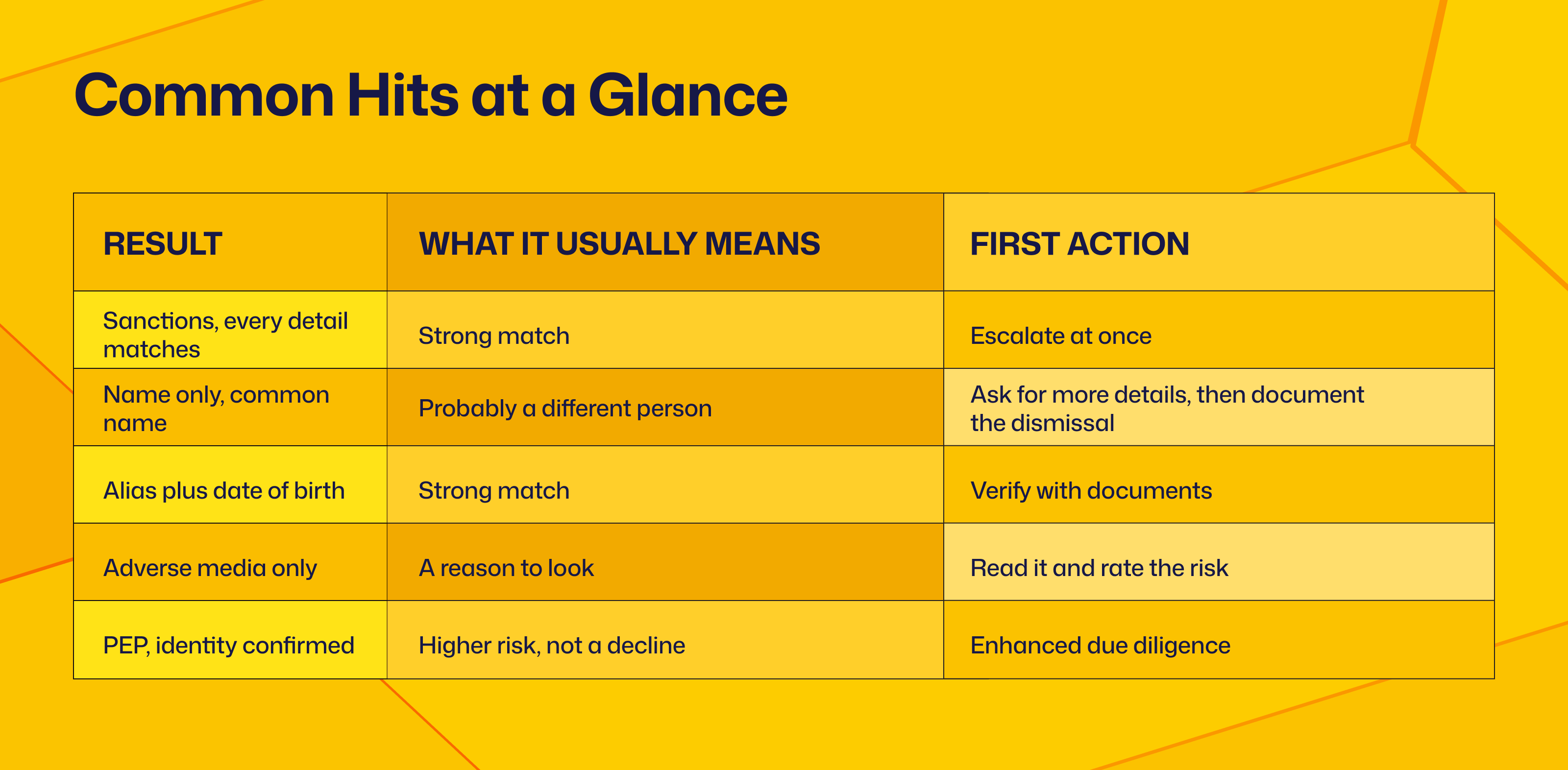
The final decision should follow your institution’s policies and applicable local laws. These examples are intended to guide screening reviews, not replace your compliance procedures.
Record the Decision

A decision you cannot explain later is almost as risky as one you never made. During a CBN examination, compliance teams may be asked why a customer was or was not classified a certain way and what happened next. The record is therefore part of the control.
Here are the details every screening review should capture:
- Use a clear status: Mark the result as No Match, Potential Match, False Positive or Confirmed Match. Setting a result to False Positive after review creates an audit trail showing that the case was assessed, not ignored.
- What a good record contains: Include the screening result, the information you checked, your decision, the reason for it, who reviewed it and when.
- A weak note versus a strong one: A note that says "Cleared" gives little explanation. A stronger note reads: "Name matches, but date of birth and country do not. ID number checked. Dismissed as a False Positive."
- When you are unsure: Escalate the case or ask for a second reviewer. Do not clear a result simply to shorten the review queue.
Avoid clearing a hit based on a name alone, dismissing a partial match without review or leaving the reason for your decision undocumented.
Here is how Dojah helps you do this in one place.
Get Results You Can Decide On With Dojah's AML Watchlist
Reading an AML screening result is only one part of the process. Compliance teams also need a way to investigate potential matches, document decisions and keep track of what happens next. Without a clear process, important details can get lost between screening and review.
Dojah's AML Watchlist brings screening and case review together, giving compliance teams the tools to:
- Screen in one place: Check customers against PEP, sanctions, warning lists and adverse media through a single search.
- Manage case reviews: Assign cases to team members, add comments and update screening statuses directly from the dashboard.
- Maintain an audit trail: Keep a record of decisions made during reviews and download PDF reports of screening results for documentation.
This gives compliance teams a more organised way to review AML hits, follow up on potential matches and document their decisions.
For compliance teams that need to screen customers and record every decision, put Dojah's AML Watchlist to work.
Frequently Asked Questions
1. Should I clear or escalate a Potential Match?
Neither, until you have checked more than the label. A Potential Match means the entry could relate to your customer and needs investigation. Compare the date of birth, country and identification details against the entry, and escalate if you cannot rule it out. The five examples above show how this works for each type of hit.
2. Can the match score alone tell me whether to clear a result?
No. The score shows how closely your customer's details resemble an entry, not whether the entry belongs to them. Read it alongside the category, the date of birth and country, and any documents you hold before you decide.
3. Can my team update a risk level, assign a case or download a report in Dojah?
Yes. In the Dojah dashboard, an AML case shows its match score and risk level, and your team can edit the risk level and the assignee. Team members can add notes to keep a record on the case, and you can download the result as a PDF report.
Start using Dojah for all your business needs