


Go back to Blog


Jennifer Edidiong
Marketing
9 min read
Share to
Dojah Product Update Roundup – October 2025
Managing a fintech, bank, or digital platform often comes with a big challenge: preventing fraud and staying compliant while keeping customer onboarding smooth.
At Dojah, we’re committed to helping businesses solve this challenge and deliver a seamless experience at every step.
In this month’s edition of Product Updates, we sat down with our Senior Product Manager, Modupe Odumosu, to break down the key improvements our product team has been working on over the past few months.
This article walks you through what’s new, how these updates work, and how they make identity verification and fraud detection easier for your business.
TL;DR – October Product Highlights
• Redesigned verification widget with real-time photo capture
• New Liveness and Image Match scoring with adjustable thresholds
• Flexible name matching for improved accuracy
• Customizable confirmation pages for a branded user experience
• Dojah’s new Trust Page for transparency and compliance assurance
1. Updated Interface for the Widget (End-User Experience)
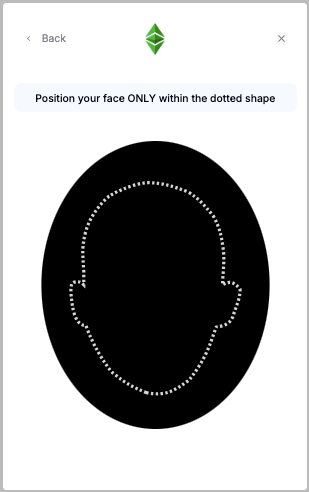
We’ve redesigned our verification widget to make the onboarding process smoother and more intuitive for your users. Previously, users had to click “capture” during liveness checks manually and often received limited guidance, leading to friction and failed attempts.
Now, the widget automatically detects when a user is ready for photo capture — providing real-time instructions to ensure a faster and more accurate verification experience.
How It Works
- Automatic detection: The widget now captures photos automatically once it detects proper face alignment and lighting.
- Real-time prompts: Users receive live cues such as “move closer” or “turn your head slightly” to ensure accurate liveness checks.
- Smart matching: The captured image is automatically compared against the ID photo or relevant government data sources to confirm identity authenticity.
- Cleaner interface: The redesigned widget focuses on usability and clear navigation for every user.
What This Means for You
- Reduced friction: No more manual captures or user confusion. Your customers move through verification faster and with less effort.
- Improved liveness accuracy: Real-time feedback helps ensure successful verifications, reducing errors and minimizing user frustration.
- Higher conversion: A smoother process means fewer drop-offs, allowing you to approve genuine users faster.
- Increased user trust: A seamless and reliable experience reassures users that their data is secure and maintains lasting confidence in your brand.
This update helps you reduce verification failures and deliver a more reliable KYC experience across all touchpoints. See the new widget in action here.
2. Liveness Score & Image Match Update
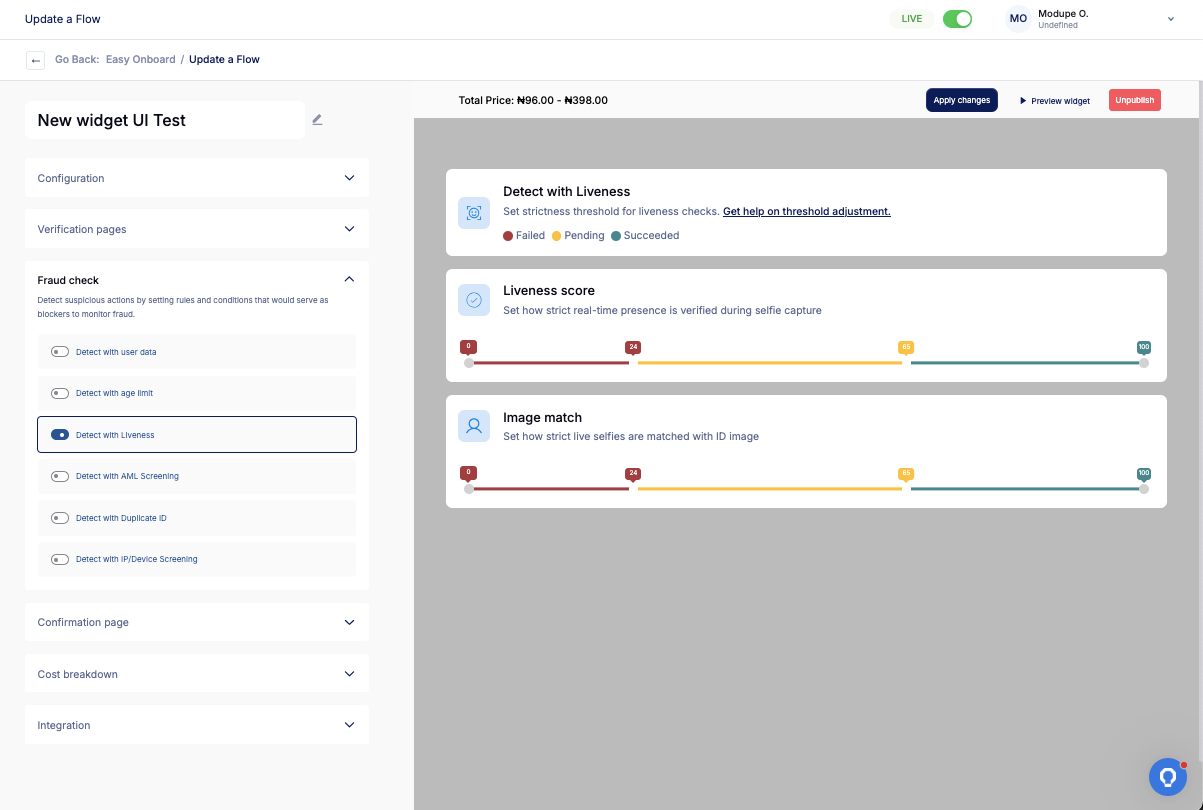
Next, we introduced a new Liveness Score feature under the EasyOnboard liveness check. This update gives you more control and visibility into how user selfies are verified.
Before now, businesses couldn’t easily adjust how these checks were scored or decide what counts as pass or fail.
With this new setup, you can now view real-time scores, set your own thresholds, and decide how strict or flexible you want your verification process to be.
How It Works
- Liveness Score: Shows if a selfie is taken live by a real person.
- Default thresholds:
- 0–24 = Fail
- 25–64 = Pending review
- 65–100 = Successful
- You can adjust these thresholds to match your preferred level of strictness.
- Example: A score of 22 fails automatically, 50 is pending review, and 78 passes.
- Default thresholds:
- Image Match Score: Compares the selfie to the photo on the submitted ID document.
- Uses the same 0–100 scoring range and adjustable thresholds.
- Example: A score of 18 fails, 47 is pending, and 90 passes.
- Customizable Rules: Add an extra fraud check layer or manually review “pending” results when needed.
- Backend Improvements: Fixed past issues where captured images didn’t display properly, making it easier for your team to review and confirm every verification record smoothly.
What This Means for You
- More control: You can now decide how strict your verification process should be by adjusting the scoring limits.
- Better fraud prevention: Spot potential spoofing or fake identities early while keeping verification easy for genuine users.
- Clearer visibility: You can see each liveness and image match score directly on your verification page for quick, transparent decision-making.
- Easier adjustments: Update thresholds anytime as your fraud prevention needs or regulations change.
Explore the new scoring system on your EasyOnboard dashboard or request a demo to see how it works in practice.
3. User Data & Image Match Update
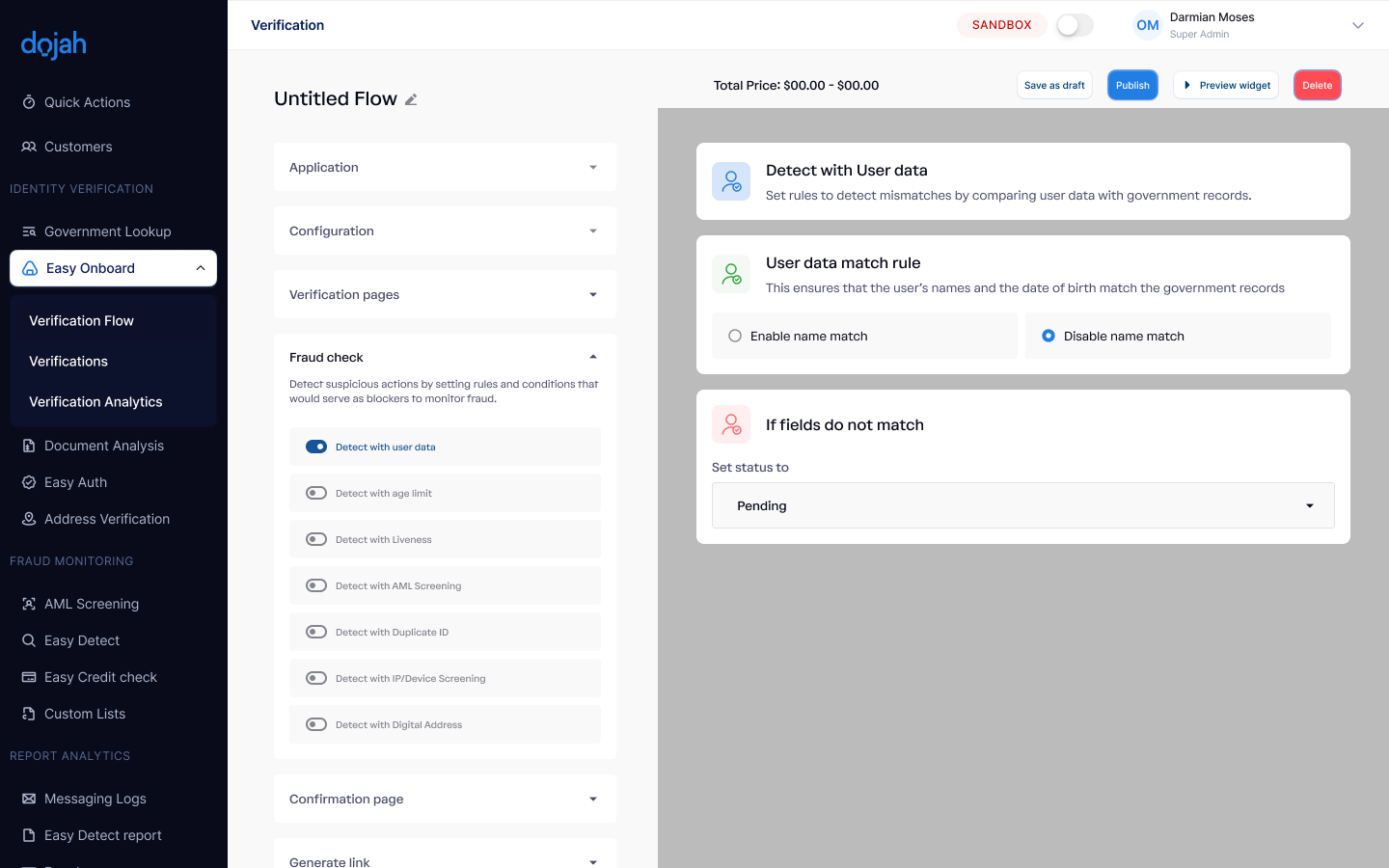
EasyOnboard now matches user data more accurately, reducing false mismatches and improving verification for your platform.
Previously, the system required an exact match of a user’s first and last names, which sometimes caused genuine users to be flagged when their names appeared differently, such as “Oluwaseun” and “Seun.”
Now, the matching logic is more flexible: it checks any two out of three government-registered names (first, middle, last) along with the date of birth.
How It Works
- Flexible Name Matching: The system compares a user’s first, middle, and last names with government records.
- If three names are available, at least two must match.
- If only two names are provided, both must match.
- DOB Confirmation: The date of birth is checked alongside the name match to confirm identity accuracy.
- Fraud Check Options:
- Automatically fail users whose name or date of birth doesn’t match government records.
- Mark mismatches as “pending” for manual review when you’d like to verify manually before rejecting.
- Turn off this fraud check entirely for straightforward flows where you prefer faster verification without extra validation layers.
What This Means for You
- Fewer false rejections: In the case where users’ names vary slightly, such as “Chinedu” vs. “Nedu,” they can still pass the verification process.
- More accurate verification: Your system can now verify genuine users more efficiently while identifying potential fraud with better accuracy.
- Better fraud control: You can adjust settings based on your company’s risk policies, deciding when to automate or manually review checks.
- Less manual work: Since false mismatches are reduced, your compliance team spends less time rechecking valid users and can focus on higher-priority cases.
You can log in to your Customer Dashboard to test this feature on or sign up to see how it works.
4. Confirmation Page Update
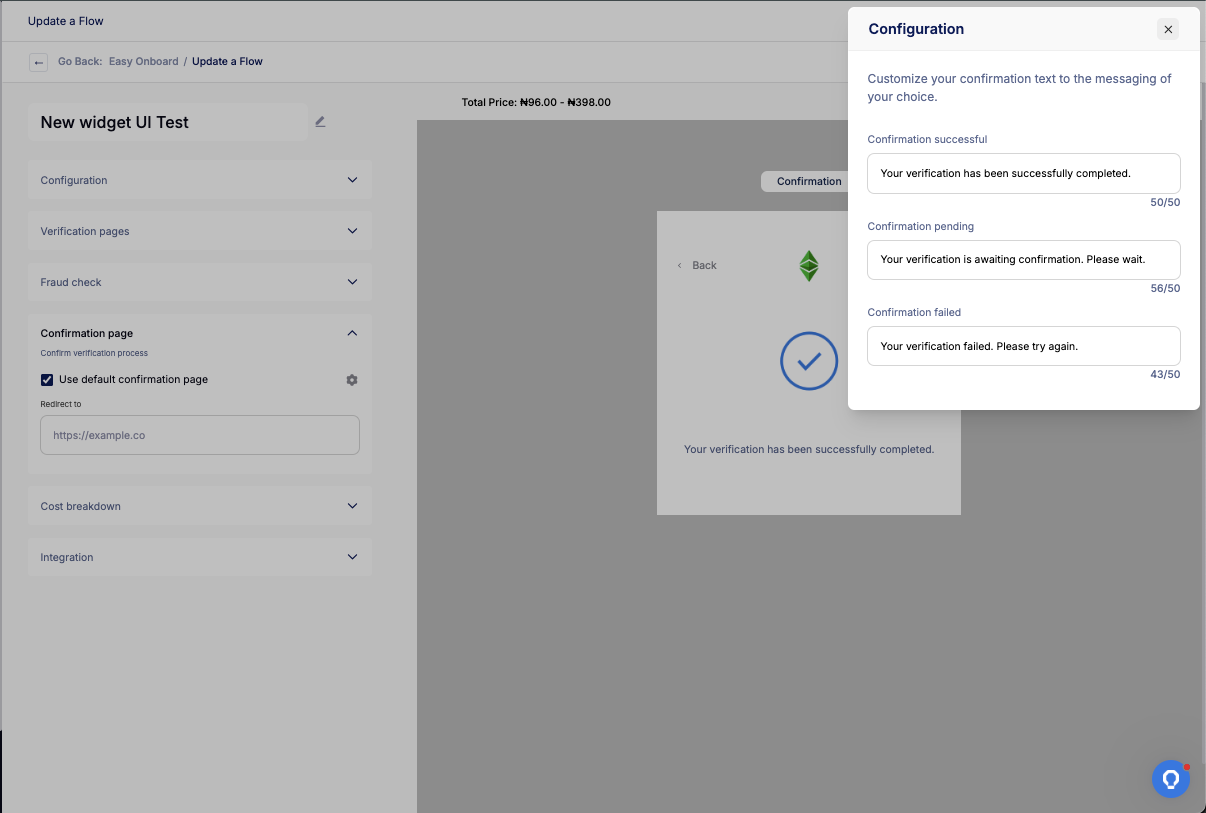
Previously, you couldn’t customize the screen users see after verification. Everyone saw the same default messages “Verification Successful” or “Verification Failed,” which didn’t always match your brand tone.
Now, you can personalize the confirmation page on both the EasyOnboard dashboard and the verification widget.
Update the text for successful, failed, and pending verification, e.g, change “Verification Successful” to “Verification Completed” or “Pending Review.” Once set, your updates automatically appear on the end-user widget.
How It Works
- Customizable Confirmation Messages: Edit the confirmation screen text directly from your EasyOnboard dashboard.
- Choose custom wording for each verification status — success, failure, or pending.
- This helps users clearly understand the outcome of their verification.
- Linked Dashboard and Widget: Whatever you update on the dashboard appears instantly on the widget, keeping the user experience consistent and on-brand.
What This Means for You
- Clear communication: Your users can easily understand whether their verification is complete, pending, or needs action.
- Branded experience: Reinforce your brand tone with messages that feel familiar with your platform.
- Smoother flow: Reduces confusion and helps users move seamlessly to the next step after verification.
To customize your confirmation page, log in to the Dojah customer app to update your verification messages.
5. Trust Page
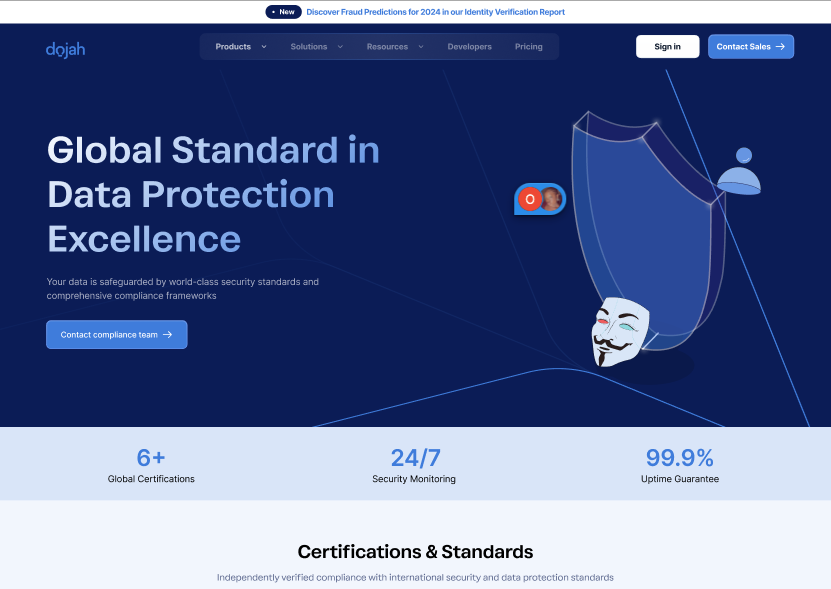
Finally, we’ve introduced a new Trust Page on our website to highlight Dojah’s commitment to security, privacy, and compliance.
It provides a simple, transparent overview of our certifications, data protection measures, and security standards so customers can easily understand how we keep their data safe.
How It Works
- Centralized Security Information: The Trust Page gathers all our compliance and data protection details in one place.
- Transparent Communication: Each section explains how we handle data, maintain security, and meet compliance standards in clear terms.
- Continuous Updates: The page is regularly updated with new certifications and policy improvements.
What This Means for You
- Increased confidence: Your users and partners can easily confirm that their data is secure.
- Transparency you can share: Show your stakeholders that you work with a trusted, compliant partner.
- Peace of mind: Know that every verification is backed by strong security and compliance practices.
You can view the new Trust Page on the Dojah website to see our security and compliance standards in detail.
At Dojah, every product update is shaped by real customer feedback. We focus on solving the pain points our users face, like improving verification accuracy and reducing false rejections.
— Modupe Odumosu, Senior Product Manager
What’s Coming Next?
We hope this update gives you a clear understanding of the latest Dojah improvements and how they help your business verify users more accurately while reducing fraud.
To learn more about how these features work in practice, you can read the full documentation for all our products here.
Our product team is also constantly working on new feature rollouts, including tools like Profiled Risk that use behavioral and transactional data to predict and prevent fraud before it happens. You can watch out for these in the coming weeks.
If you have any questions or feedback, visit our help centre or reach out to support@dojah.io — we’d love to hear from you.
Also, to explore how Dojah can simplify your verification and fraud prevention process, book a demo here.
Start using Dojah for all your business needs


