


Go back to Blog


Jennifer Edidiong
Marketing
8 min read
Share to
Dojah Product Update Roundup – February 2026
Running a fintech, bank, or digital platform comes with one big challenge: stopping fraud and staying compliant without slowing down your users.
At Dojah, we’re focused on making identity verification and fraud detection more effective, so you can onboard users seamlessly and protect your platform from suspicious activity at every stage.
For our first Product Update roundup of 2026, we sat down with our Senior Product Manager, Modupe Odumosu, to share the latest improvements that help you spot risky behavior faster, get clearer insights on user activity, and make verification faster.
1. Duplicate Image Detection
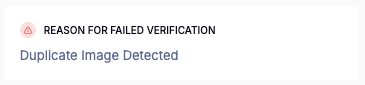
We introduced a new Duplicate Image Detection feature to strengthen fraud prevention at onboarding.
This was prompted by a headcase where a customer noticed an end user trying to create multiple accounts using different BVNs, but the exact same image.
To combat this, we added an additional fraud layer that detects when a previously verified image is reused during a new onboarding attempt and flags it for review before the account is approved.
How It Works
- Image reuse detection: When a user tries to create a new account using an image that has already been verified on your platform, the system automatically flags it for review.
- Cross-identity checks: If the same image appears across different BVNs or identities, your team is alerted immediately for investigation before approval.
What This Means for You
- Stronger fraud control at the entry point: You can detect identity reuse early and stop suspicious accounts before they go live.
- Prevents multiple account creation: Stops individuals from opening several accounts using recycled biometric data, helping you maintain better control over user access.
- Reduced exposure to synthetic identity fraud: Protects your platform against AI-powered identity manipulation and repeat abuse attempts.
To test this feature, log in to your Dojah dashboard to configure and monitor duplicate image detection. You can also review the documentation for a step-by-step guide on how to set it up within your verification flow.
2. User Verification PDF Download
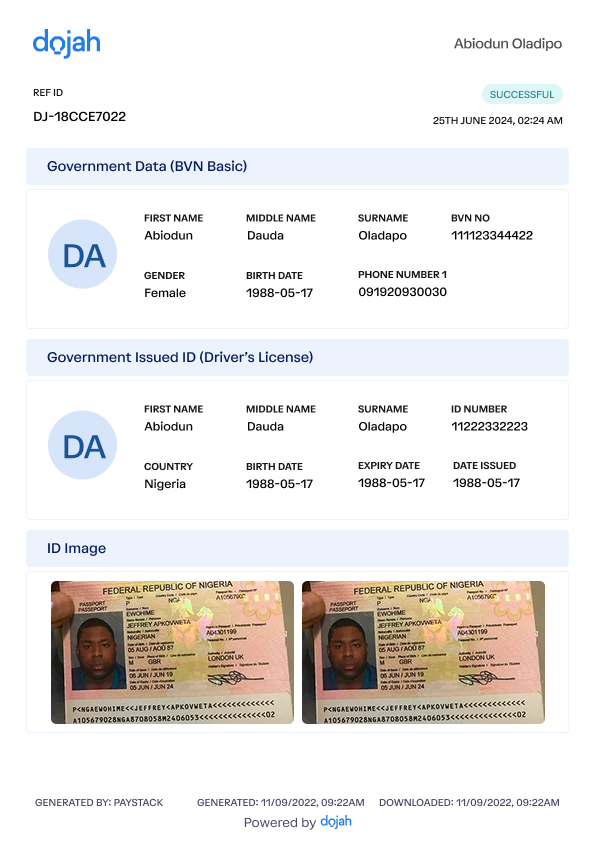
Next, we now have a Verification PDF Download feature to give you full visibility into each user’s verification journey.
Now, you can download a detailed report for any verification, showing all steps taken, the documents used, and the verification status for each user. For longer-term analysis, you can also export multiple records as an Excel sheet within a specific date range, giving you flexible reporting options.
This was prompted by customer requests for easier access to verification data at a glance, so teams can get insights without digging into the platform manually.
How It Works
- Per-user PDF report: Download a full verification report for an individual user, showing all steps, documents, and outcomes.
- Bulk Excel export: Select a period (daily, weekly, or monthly) to export multiple user verifications for broader analysis.
- Quick access via dashboard: Log in to your Dojah dashboard to download PDFs or export Excel files anytime.
What This Means for You
- Clear insights at a glance: Quickly understand each user’s verification journey and spot trends or anomalies without extra effort.
- Simplified reporting: Easily share verification records with your team or management, or use them for compliance purposes.
This helps you gain deeper insights into your verification processes and monitor your user data efficiently. Test it out by logging in to your dashboard and generating a report for one of your users today.
3. EasyOnboard Verification Analytics – Abandoned Steps
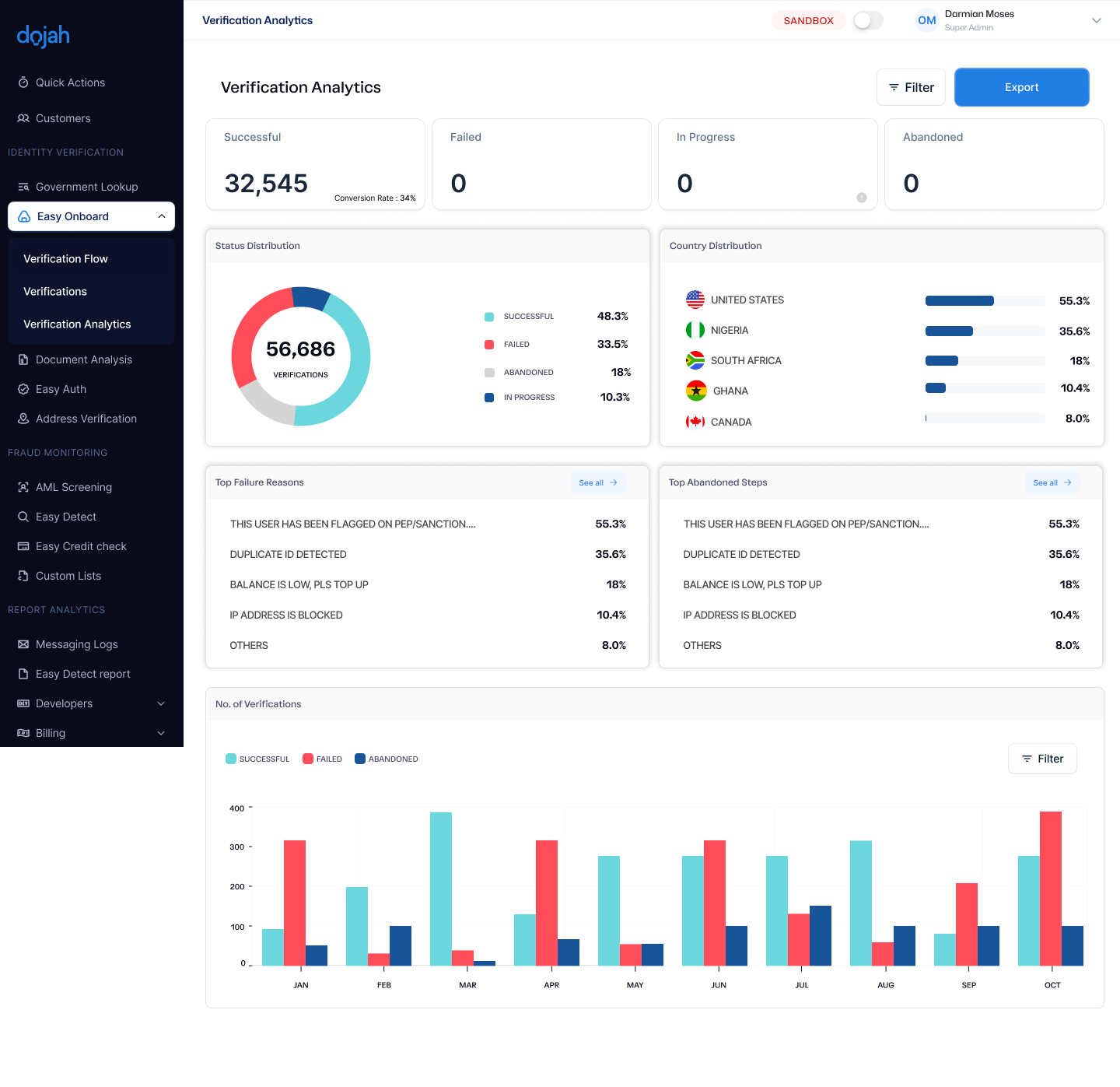
On the EasyOnboard verification analytics page, you can now track abandoned verifications, showing exactly where users dropped off during the process.
Previously, the analytics page only captured failed verifications, like those failing due to low balance or duplicate detection. Now, you can see where users didn’t complete verification, giving you a clearer picture of the user journey and the points causing friction.
How It Works
- Abandoned step tracking: The system records the exact step where a user stopped completing verification, like the liveness screen or government data screen.
- Filterable by date or period: View abandoned steps daily, weekly, or by year to spot trends over time.
- Side-by-side with failures: Compare abandoned steps against failed verifications to understand both drop-offs and completed failures.
What This Means for You
- Identify friction points: See exactly where users are dropping off so you can fix bottlenecks and streamline the onboarding experience.
- Reduce churn: Understanding where users abandon verification helps you take action to increase completion rates and retain more users.
- Better insight into user behavior: Track patterns over time to inform product improvements and optimize your verification flow.
You can check your EasyOnboard verification analytics page to filter abandoned verifications and see the insights in action.
4. Digital Address Verification – Business & Individual Addresses
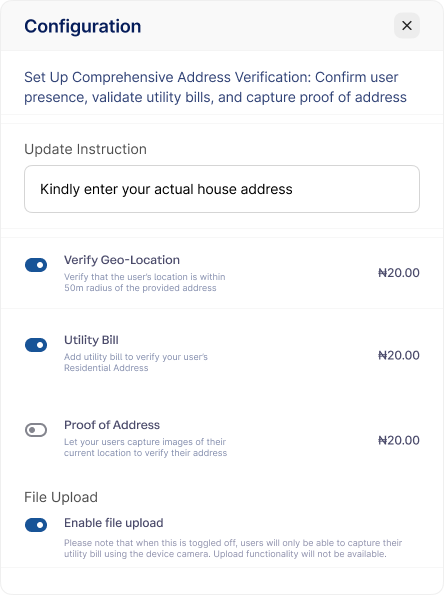
Last year, we introduced Digital Address Verification to help you confirm users’ locations accurately while reducing the need for manual field checks. This system combined geolocation, utility bill verification, and proof of address captures to ensure every submitted address could be trusted.
Now, you can customize the address instruction on the widget. Previously, it prompted users with “Kindly enter your actual address,” which worked for individual house verification. With this, you can change it to “Enter your business address”, making it easier to onboard merchants, business clients, or any users whose verified address isn’t a personal residence.
How It Works
- Customizable address instructions: Adjust the widget text to ask for a house or business address depending on your verification needs.
- Geolocation verification: Confirms the user’s current location is within 50 meters of the submitted address. Users must have location services enabled.
- Utility bill verification: Checks the validity of a submitted utility bill and ensures it matches the address provided.
- Proof of address captures: Users submit images of their address, including the inside (compound), outside (gate & house number), and street. The system verifies the images and geotags the location to ensure accuracy, reducing the need for on-site visits.
What This Means for You
- Flexible verification for business clients: Easily onboard merchants or businesses by verifying their business address instead of a personal address.
- Operational efficiency: Reduces the cost and effort of sending agents for manual address verification.
- Accurate and reliable data: Combining geolocation, utility bills, and proof of address ensures the addresses you capture are trustworthy and complete.
This helps you onboard both individual and business users while maintaining strong verification standards. To use this feature, log in to your Dojah dashboard and update the widget instructions for your address verification flow.
5. Easy Authentication – Linking with Easy Onboard
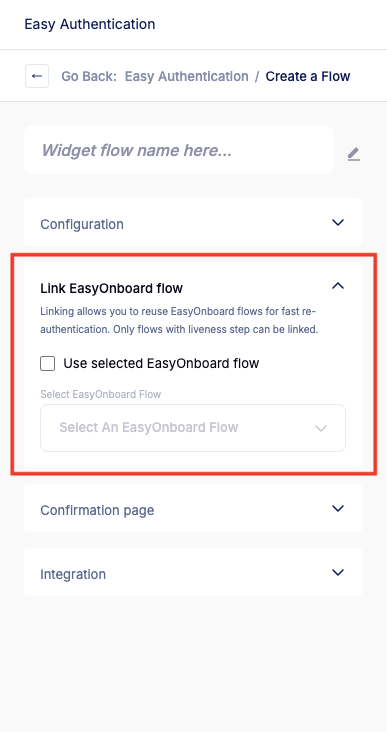
We also introduced Easy Authentication last year to simplify re-verifying users without going through the full onboarding process. Instead of uploading IDs and filling forms again, users only needed to capture a selfie, which is matched against their stored data. This was especially useful for reactivating accounts or processing high volumes of users quickly.
Now, the update lets you link your Easy Onboard flow to Easy Authentication, so liveness data captured during onboarding is automatically stored and used for future re-authentication.
How It Works
- Linking flows: Connect the Easy Onboard flow (with liveness verification) to Easy Authentication before completing the initial onboarding.
- Automatic liveness storage: The selfie captured during onboarding becomes the user’s registered liveness for all future re-authentications.
- One-step re-authentication: Users only take one selfie for verification instead of two, saving time and improving experience.
- Seamless integration: User data and reference ID are passed via your JavaScript web view or appended to the link for smooth processing.
What This Means for You
- Faster re-verification: Users can reactivate accounts or complete high-value actions quickly, without repeating the full onboarding process.
- Reduced friction: One selfie verification keeps your users engaged and minimizes drop-offs.
- Better scalability: Easily handle large volumes of returning users without overloading your support or compliance teams.
- Improved user experience: A smoother authentication flow builds trust and satisfaction with your platform.
Link your Easy Onboard flow to Easy Authentication in your dashboard and re-authenticate a returning user to see it in action.
What’s Next?
We hope this update gives you a clearer view of how our latest improvements help you verify users more efficiently and detect fraud at the onboarding stage.
We also recently launched Profiled Risk, a unified fraud detection tool that uses behavioral and transactional data to help you spot risky activity beyond onboarding. This is part of our effort to help you prevent fraud and build trust with your users.
To explore these updates and see how they can improve your verification workflow, book a demo or check out the full product documentation here.
If you have any questions or feedback, visit our Help Centre or reach out to us at support@dojah.io — we’d love to hear from you.
Start using Dojah for all your business needs


