


Go back to Blog


Jennifer Edidiong
Marketing
10 min read
Share to
Dojah Product Update Roundup – September 2026

As a fintech or digital platform, constantly improving your fraud prevention and identity verification systems is crucial to protecting your users, staying compliant, and building trust at scale. At Dojah, we are committed to helping you do exactly that, one product update at a time.
This month, we sat down with our product team, led by Oluwatomiwa Alade, to break down everything that shipped recently and what it means for how you use Dojah day-to-day.
1. IP Whitelisting
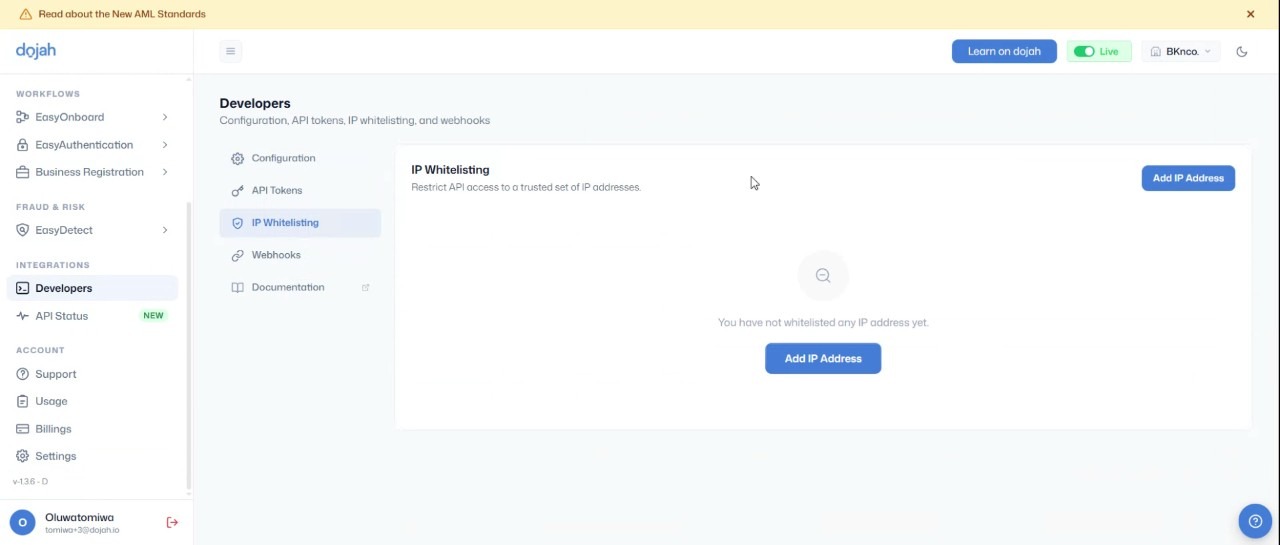
Previously, once your API credentials were live, any request with a valid key could reach your API, regardless of where that request came from. There was no way to say "only let these specific networks in." If a key leaked or ended up somewhere it should not, that was often enough for someone to get through.
Now, you can restrict API access to a trusted list of IP addresses under your developer settings. Anything outside that list gets blocked automatically, even if the request comes with valid credentials.
How It Works
- Log in to your Dojah dashboard and go to Developer Settings
- Find IP Whitelisting and add the specific server or network IP addresses you want to approve
- Save your changes; from that point on, any request from an IP not on your list is automatically blocked, even with valid credentials
- This setting applies across your entire account, not just one product
What This Means for You
- Lock out unauthorized access: even with a valid API key, requests from outside your approved networks simply won't get through
- Turn a leaked key into a dead end: if credentials ever get exposed, whoever has them still can't do anything without also being on your whitelisted network
- Strengthen your overall fraud prevention: restricting access at the network level closes a gap that key-based authentication alone can't cover
2. Allowed Origin Settings
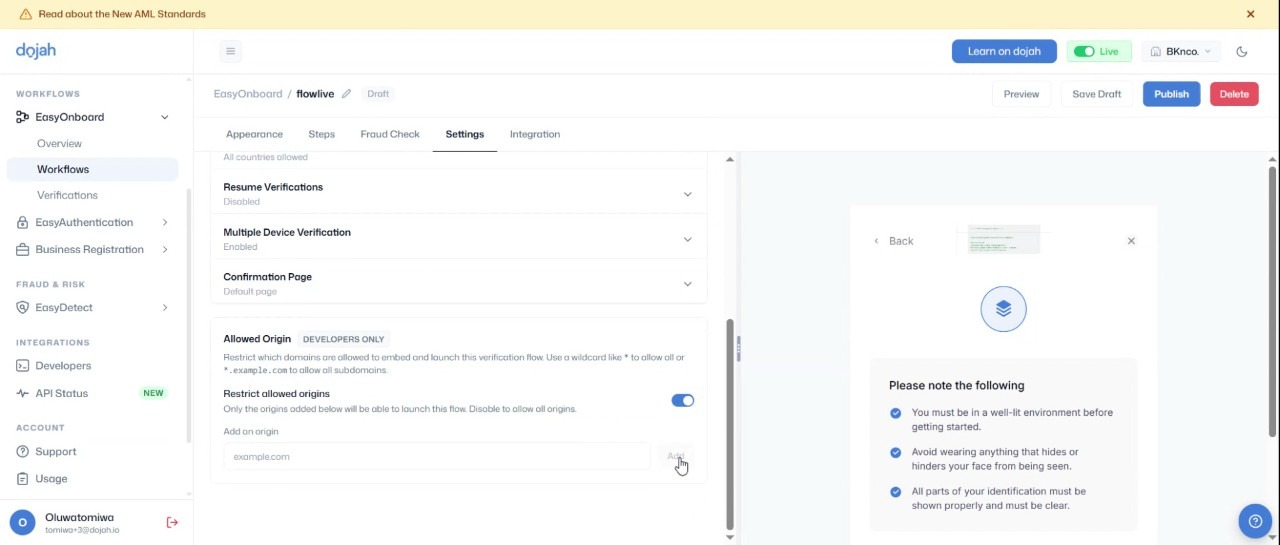
Your Easy Onboard verification widget could once be launched from any website that embedded it, with no way to restrict where it showed up. If someone copied your widget code and dropped it onto a domain you never approved, there was nothing stopping it from loading and running there.
Now, Allowed Origin settings put you in control of exactly which domains can launch your widget. You define a list of approved domains, and once the setting is turned on, only those domains can pull up your verification flow.
How It Works
- Head to your Easy Onboard settings and locate Allowed Origins
- Add every domain or subdomain that should be permitted to launch your widget
- Toggle the setting on to enforce the whitelist, or off if you want the widget accessible anywhere, add or remove domains any time
What This Means for You
- Tighter brand control: Nobody can quietly embed your verification flow on a site you never approved
- Reduced fraud exposure: You decide exactly where your verification experience shows up to end users
- Scales with you: Running several domains is not a problem; just keep the list updated as you grow
3. Compliance Module and Business Registration Flow
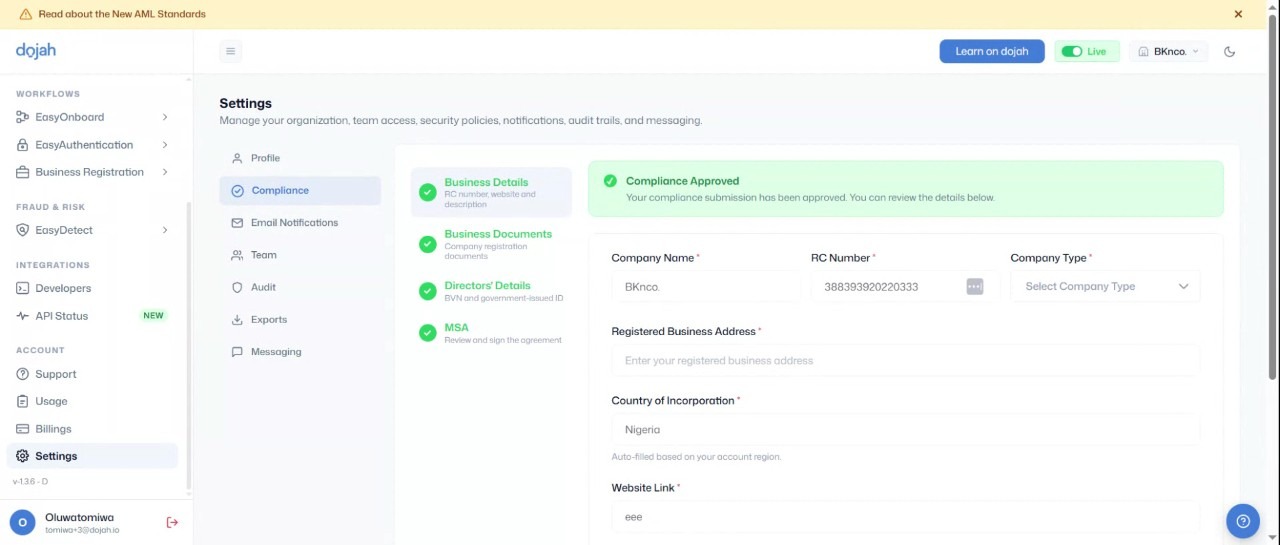
Before this update, new customers often had to wait on a member of our support team just to move forward with compliance steps during onboarding, which slowed things down on both sides.
Now, the compliance module sits front and center for new customers, and the full business registration flow runs directly through the dashboard.
How It Works
- Log in to your dashboard; the compliance module will be visible immediately if you are a new customer
- Submit your business details, supporting documents, and director information directly through the module
- Our compliance team reviews your submission. If everything checks out, you are verified; if something is off, you get a rejection notice with an explanation so you can correct and resubmit
- Most reviews are completed within 24 to 48 hours
What This Means for You
- Self-serve onboarding: you are no longer stuck waiting on a support ticket to move forward
- Clarity when something goes wrong: a specific explanation means you can fix and resubmit fast instead of guessing
- Predictable timelines: a 24 to 48 hour review window makes it easier to plan your own go-live date
4. Location Distribution Analytics
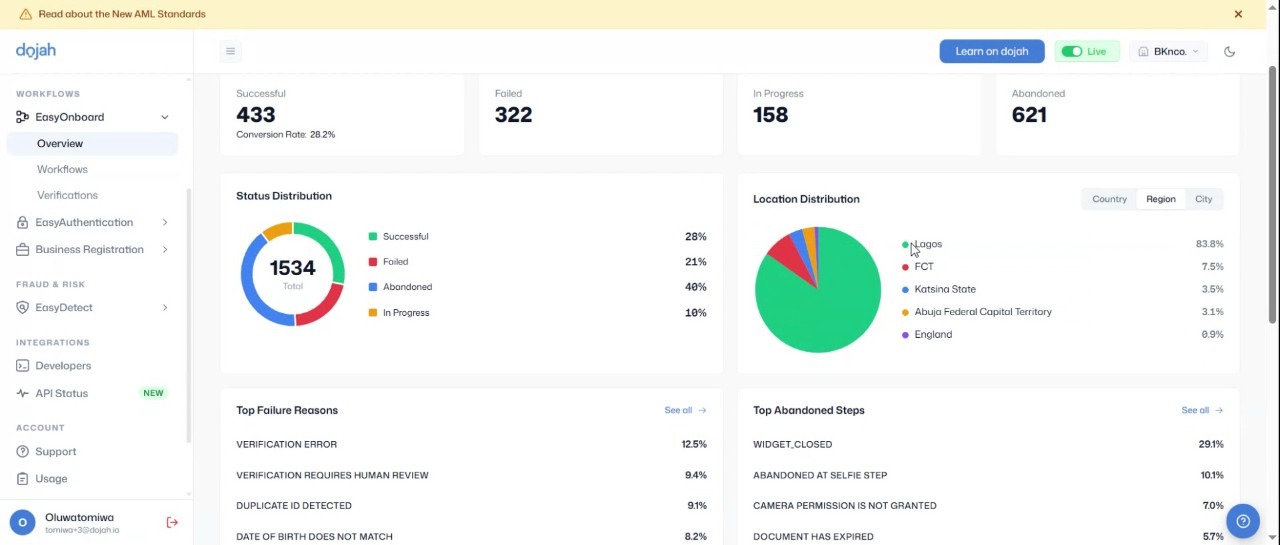
Easy Onboard now breaks down your verification and onboarding activity by country, region, state, and city. So instead of just knowing how many users you verified, you can see exactly where they are, down to a state like Lagos or a city like Ikeja.
This gives you a real picture of your actual user base, not just a total count, and helps you understand who you are serving and where your KYC flow is working well or falling short in specific locations.
How It Works
- Open Easy Onboard from your dashboard and go to Analytics
- Select the location distribution view to see activity broken down by country, state, and city
- Data reflects real-time activity, not a delayed report
What This Means for You
- Know your audience better: see exactly where your users are coming from, down to specific cities and states, not just a general sense of your market
- Spot where your KYC flow is working best: if verifications are dropping off or succeeding unevenly in certain locations, this view can help you catch it
5. Usage Analytics, Renamed and Expanded
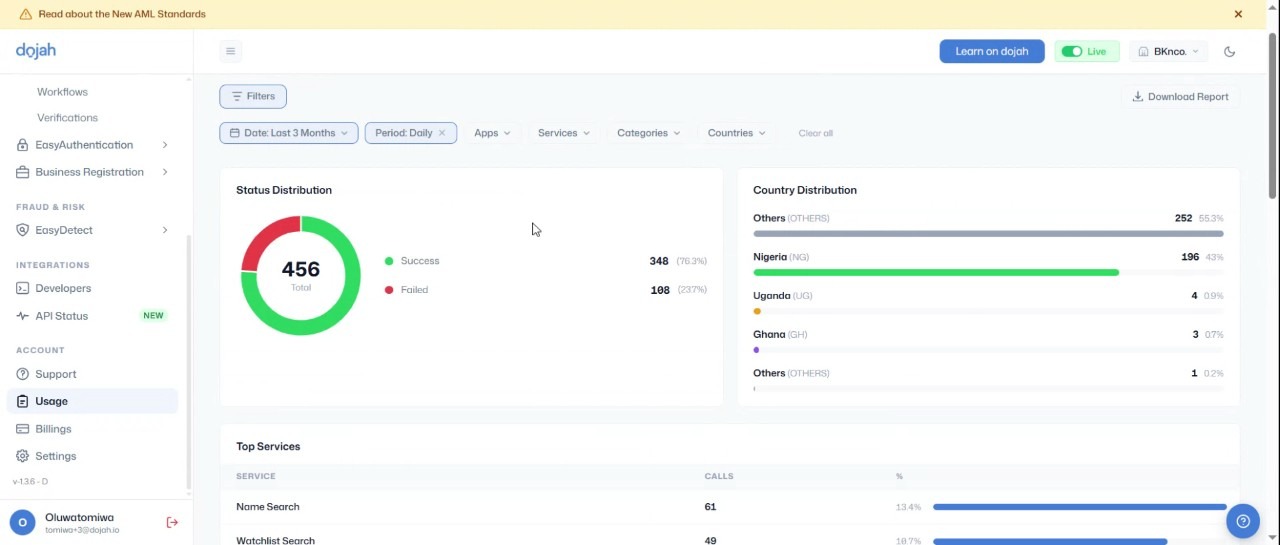
This section of the dashboard used to be called API calls, and it gave you a fairly basic count of activity with little context around it. If you wanted to know why a service was failing or which one your business relied on most, the raw number alone could not tell you.
Now, it has been renamed to Usage, and it comes with a full analytics view built around it, covering success and failure rates, your top called services, and user location data, all filterable so you can get to the specific slice of activity you actually care about.
How It Works
- Go to the Usage tab on your dashboard, previously labeled API calls
- Filter by date range, country, category, or service type to narrow down exactly what you need
- Review success rates, failure rates, and top called services from the same view
What This Means for You
- Find problems faster: When something breaks, you can narrow down what and where, instead of starting from a single raw number
- Clearer performance insight: see which services your business relies on most and how reliably they are running
- Less back and forth with support: many answers you would have needed to ask us for are now available to pull yourself.
6. Back Camera Flip for Agent Assisted Verification
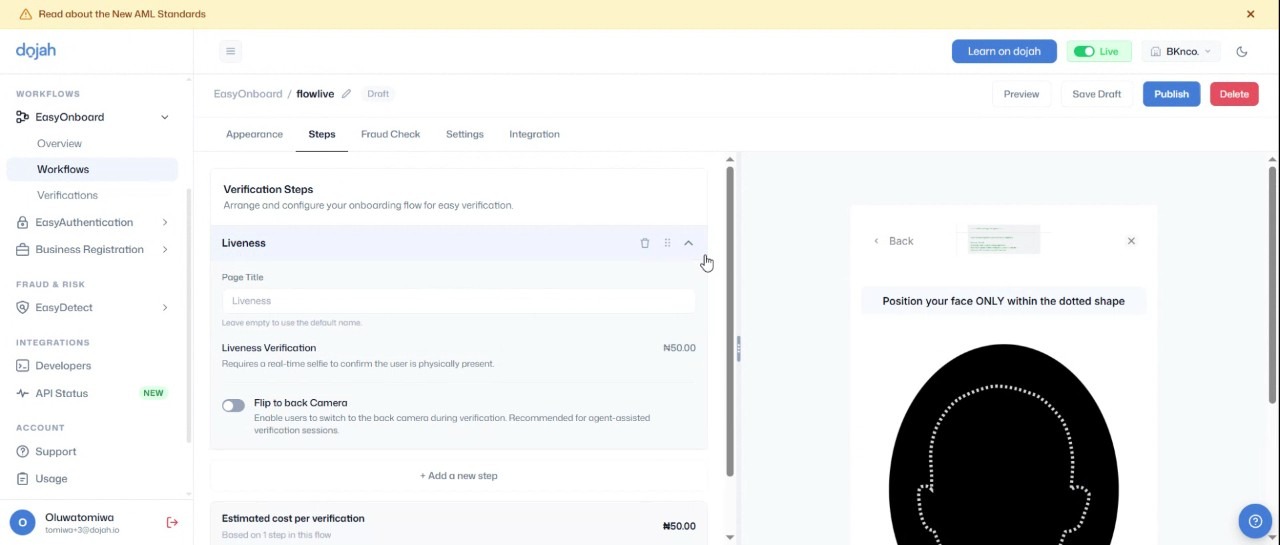
Liveness checks on Easy Onboard used to default to the front camera, which works fine when a user is verifying themselves with their own phone. But it does not work in situations where someone else, like an agent, is completing the verification on a customer's behalf, since the agent would need to see the customer, not themselves.
Now, agents can flip to the back camera mid-session, making it possible to run a proper liveness check on someone standing right in front of them, not just a self-service selfie. This matters most for any business verifying customers face-to-face, like an agent at a physical retail location.
How It Works
- Start a liveness check as usual through Easy Onboard
- During the session, the agent selects the option to switch from the front to the back camera
- Complete the verification on the customer's behalf using the back camera
What This Means for You
- Opens up physical verification: agents at retail locations or in-person touchpoints can now run proper liveness checks on customers standing right in front of them
- Not limited to self-service: you are no longer restricted to flows where the end user holds their own phone
7. Dojah Learning
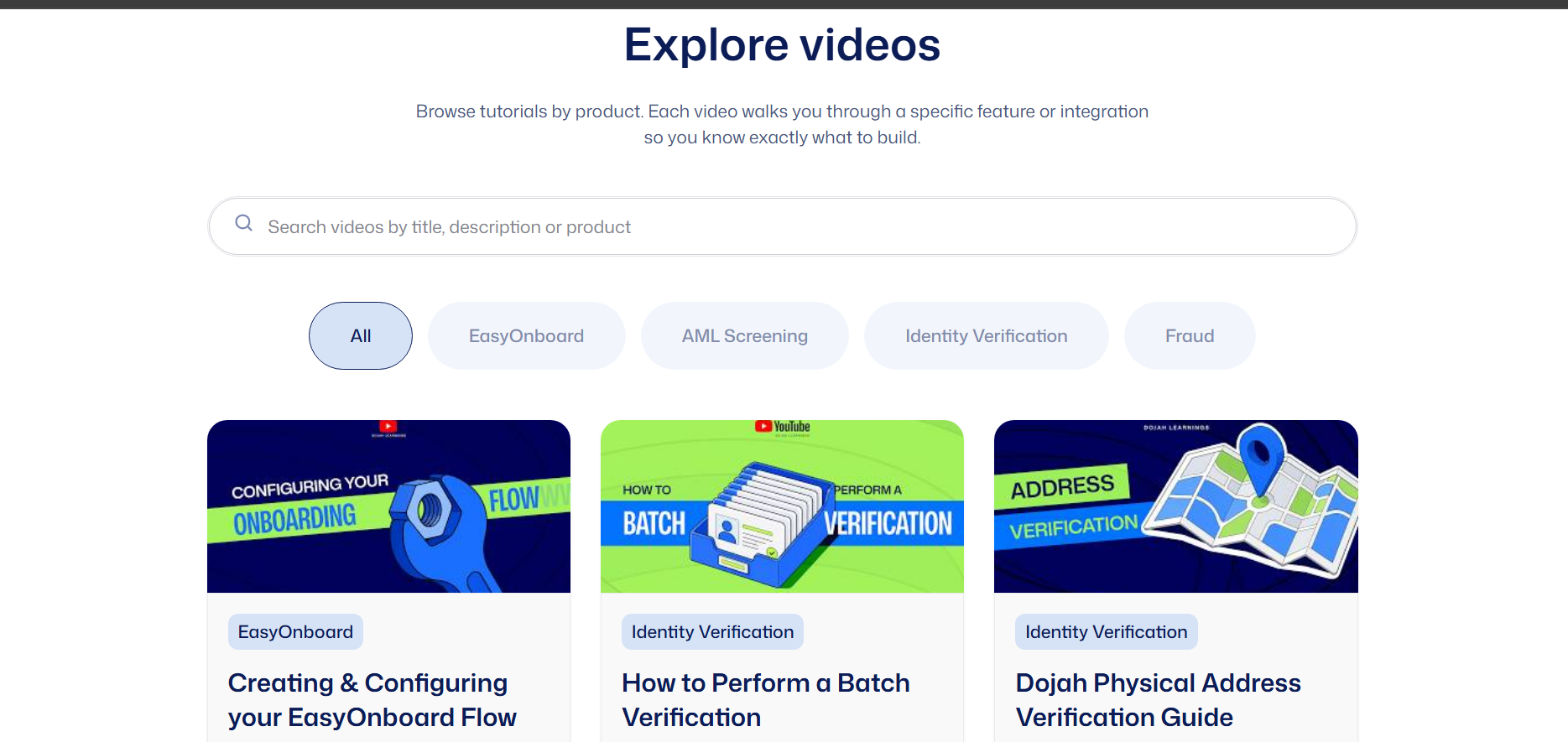
If you or your team wanted to understand how a specific feature worked, like running an AML check or completing an address verification, your main options used to be booking a demo call or reaching out to support and waiting on a response.
Now, Dojah Learning gives you a full video tutorial library built directly into the dashboard, so you can find a walkthrough for a specific task whenever you need one, without scheduling anything or waiting on anyone.
How It Works
- Log in to your dashboard and open Dojah Learning
- Browse the video library by task, such as AML checks or address verification
- Watch at your own pace, no demo booking or support ticket required
What This Means for You
- Get your team up to speed faster: new hires can work through the videos at their own pace instead of waiting on someone to walk them through the dashboard
- Stop guessing your way through features: if you're unsure how AML checks or address verification actually work, there's a clear walkthrough instead of trial and error
- Answers whenever you need them: no booking a call or waiting on a support reply, just pull up the video the moment a question comes up
8. MSA Workflow Update
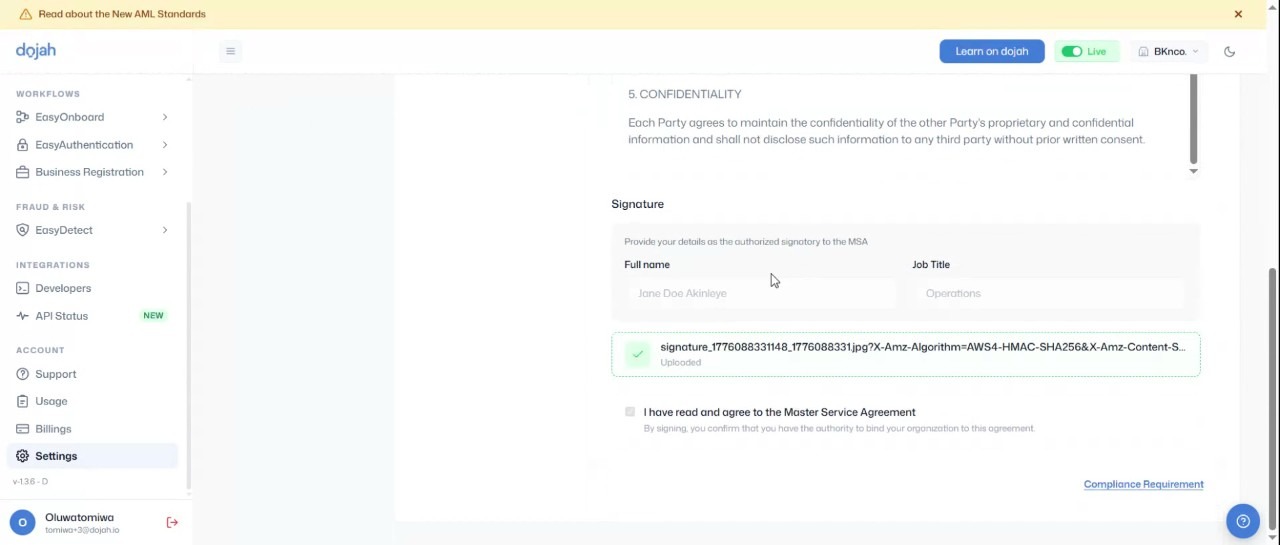
The Master Service Agreement form used to only have space for director details and a signature, but the form was often filled out by compliance staff rather than the director themselves, which created mismatches between who signed and who was on record.
Now, the person actually signing the document enters their own name and job title, while director details stay in their own dedicated section.
How It Works
- Open the MSA form from your compliance dashboard
- Enter your own name and job title in the signatory section
- Fill in director details separately in the dedicated section provided
What This Means for You
- Accurate compliance records: the document reflects who actually signed it, not just who is listed as director
- Sail through compliance reviews faster: Accurate signatory details mean fewer flags and back and forth when your MSA gets checked
- Protect yourself during audits: Having the right name attached to the right signature matters if anyone ever needs to verify who authorized what
What's Coming Next?
We are not slowing down. Our product team is already working on the next set of tools to help you catch fraud earlier and verify with even less friction, so keep an eye on this space.
Ready to try any of these updates for yourself? Log in to your Dojah dashboard, or sign up if you are new to Dojah.
Want a walkthrough first? Head to Dojah Learning for video guides on AML checks, address verification, and more.
If you have any questions or feedback, visit our help centre or reach out to support@dojah.io; we would love to hear from you.
Start using Dojah for all your business needs


