


Go back to Blog


Jennifer Edidiong
Marketing
11 min read
Share to
How to Build a KYC Onboarding Flow Without Writing a Single Line of Code

Building a KYC (Know Your Customer) onboarding flow from scratch can be a huge challenge for developers and product managers. You have to handle government database integrations, document uploads, and liveness detection across every device, all while maintaining security and brand consistency.
Without a clear guide on best practices and a well-defined implementation plan, onboarding can quickly become frustrating and slow. This is also especially hard without an effective eKYC solution in Nigeria.
Now imagine setting up a fully branded KYC experience without writing a single line of code. Dojah’s EasyOnboard was designed to help you do just that.
This guide shows you how to go from zero to fully verified users using Dojah’s no-code onboarding tools, making onboarding seamless for both your technical team and your users.
How Dojah’s EasyOnboard Lets You Do KYC Without Writing Code
Dojah is a powerhouse of identity verification APIs, and EasyOnboard puts a human-friendly, visual layer on top. With its drag-and-drop builder, you can string together verification steps like NIN checks, BVN validation, and liveness tests. This creates a smooth, seamless onboarding flow for your users.
If you’re wondering what digital KYC in fintech looks like, EasyOnboard makes it simple: instead of your developers spending weeks reading API documentation and handling edge cases, you—as the product owner, founder, or compliance officer—can just toggle features on or off. When your flow is ready, Dojah generates a Flow Link: a single URL you can share with users or embed directly in your app.
What is EasyOnboard?
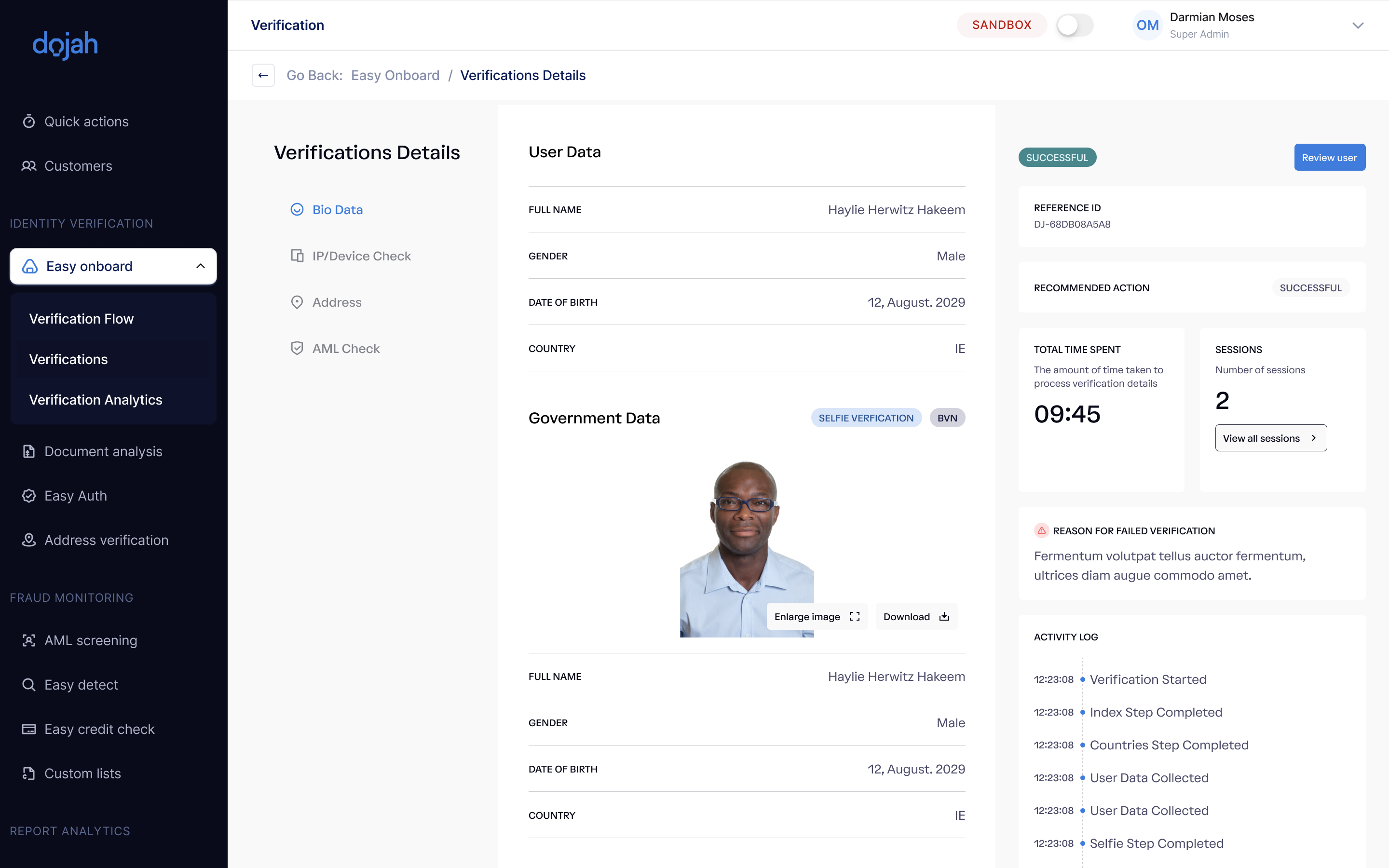
EasyOnboard is a no-code identity verification and user onboarding solution. Think of it as a "Typeform" or "Google Forms" specifically designed for KYC. It handles the UI (the screens the user sees), the logic (verifying the data against government sources), and the result (telling you if the user is who they say they are).
How EasyOnboard Simplifies the KYC process
When we talk about "making KYC easy," we mean removing the technical friction. With EasyOnboard, you can:
- Validate Identity Instantly: Connect to databases across Africa (Nigeria, Kenya, Ghana, etc.) and beyond.
- Prevent Fraud: Use AI-powered biometrics to ensure the person behind the screen is actually alive.
- Scale Fast: Launch in new markets by just selecting a different country from a dropdown menu.
Some Common Ways Businesses Use EasyOnboard
- Fintechs: To verify BVN/NIN before allowing a user to open a digital wallet.
- Real Estate: To perform background checks on potential tenants or buyers.
- Logistics & Mobility: Verifying the driver’s licenses of couriers or ride-hailing partners.
- E-commerce: Verifying high-value sellers to prevent marketplace fraud.
How to Create Your First Verification Flow
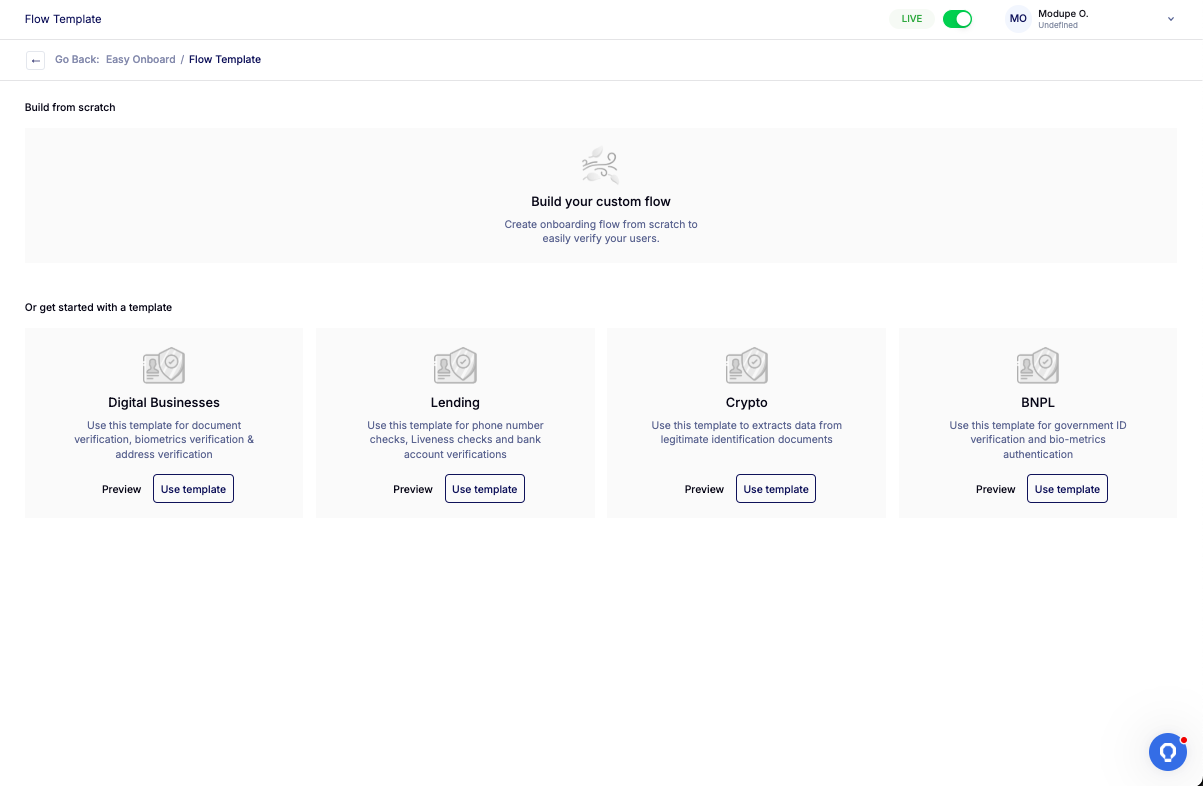
Once you’ve located the EasyOnboard button in your Dojah customer dashboard, creating your first verification flow is simple. Just follow these steps to get started:
Step 1: Click "Create a Flow"
Find the "Create a Flow" button at the top right corner of your screen and click it. This opens a new workspace where you can start building your onboarding process.
Step 2: Give Your Flow a Clear Title
Enter a descriptive title for your flow so you can easily identify it later. If you’re just testing, you could call it "Standard User Onboarding." Clear naming helps you and your team stay organized as you create multiple flows.
Step 3: Choose a Template or Start from Scratch
Decide whether to use one of Dojah’s pre-built templates for common verification needs or start entirely from scratch. Templates are helpful if you want a quick setup, while starting from scratch gives you full control over every verification step
Configuring Your Flow: The Visual Command Center
This is where you define how your users experience onboarding and how strict your security measures should be. Every setting here helps you balance security and branding.
Configuration
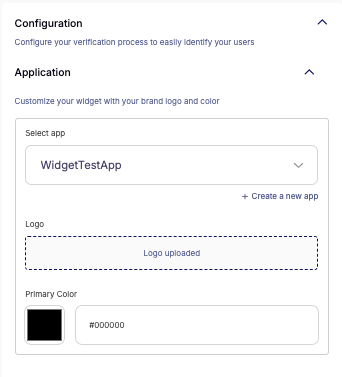
This is the first step in setting the "ground rules."
- Application: Start by customizing the widget with your brand logo and primary color. This may seem small, but it’s essential. Users are more likely to trust and complete verification when the process feels like part of your app
- Add Business Display Name (NEW): You can now enter the exact name you want to appear on the verification widget. For example, if your legal company name is "XYZ Holdings" but everyone knows you as "PayFast," you can set it to show "PayFast." This keeps the experience familiar and builds trust.
- Country Selection: Select the country your users are in. Dojah’s engine automatically loads the relevant ID types for that region. For instance, NIN for Nigeria or IPRS for Kenya, so users only see what applies to them.
Review Process
Decide how you want to approve users:
- Automatic: The system decides based on a "pass/fail" result from the government database and liveness checks. This is fast and ideal for low-risk flows.
- Manual: Every verification is sent to your dashboard for a human review. Perfect for high-risk businesses or when you want tighter control.
Multiple Device Verification
Sometimes a user starts onboarding on their laptop but needs to switch to their phone to take a clear selfie (since phone cameras are usually better).
- Toggle on/off: You can disable the multiple device verification screen if you want users to stay on a single device throughout the journey.
Notifications
Stay informed without constantly checking the dashboard:
- Webhook Notification: Sends a message to your server the moment a verification is finished.
- Send Status to Users: Toggle this on to automatically email users when they pass or fail verification.
- Support Email: If a user gets stuck, they can click a button to contact your support team directly.
Verification Pages: Designing the User Journey
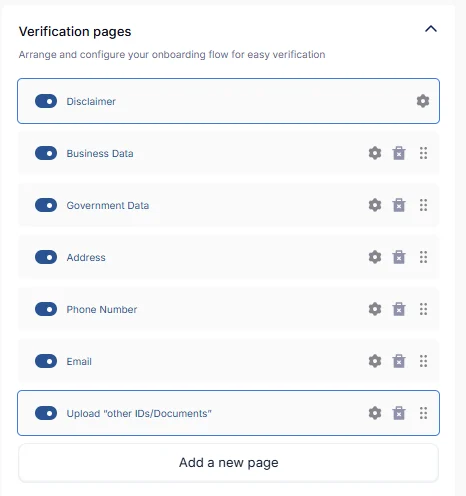
This is the heart of your onboarding flow. These pages are where users interact with your platform, submit their documents, and prove their identity. You have full control, and you can customize each page to create an intuitive journey that keeps users engaged from start to finish.
Page Type | What it does |
Disclaimer | A "terms and conditions" style page where users consent to data processing. |
User Data | Asks for basic info like Full Name, Date of Birth, and Gender. |
Government Data | The "lookup" phase. Users enter their ID number (BVN, NIN, etc.). |
Liveness | The camera opens, and the user is asked to perform a simple action (like blinking or smiling) to prove they aren't a photo or a deepfake. |
Business Data | For B2B flows. Asks for RC numbers or Tax IDs. |
Phone / Email | Verification via OTP (One-Time Password) to ensure the contact info is real. |
Business ID | Capturing official corporate identity documents. |
Address | This isn't just typing an address. It asks users to capture live images of their home, street view, and house number. |
Gov. Issued ID | A photo upload of the physical ID card (Passport, Driver’s License). |
Upload "Other IDs" | Need a utility bill or a birth certificate? Use this toggle. |
Signature | A digital pad where users can draw their signature with their finger or mouse. |
Questions | Custom fields where you can ask anything—like "How did you hear about us?" or "What is your monthly income?" |
Fraud Check Options: Your Invisible Security Guard
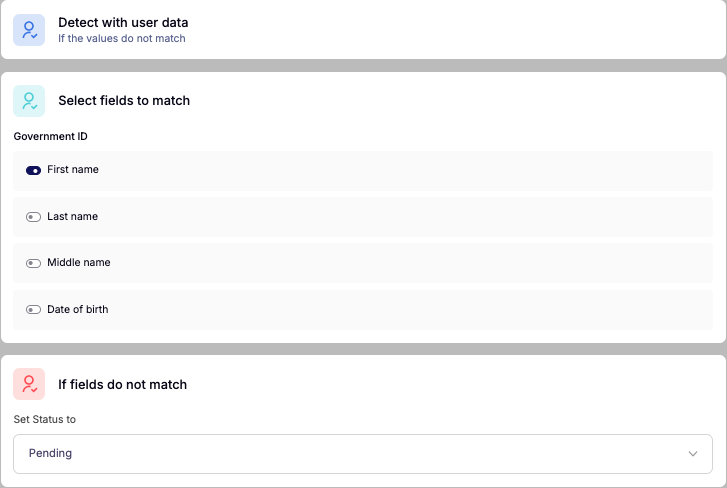
Dojah doesn’t just collect user data; it actively analyzes it to help prevent fraud. You can set “Blockers” that automatically stop a verification if anything looks suspicious, keeping your onboarding flow secure without slowing down legitimate users.
- Detect with User Data
Automatically fails a user if the name they entered doesn’t match the one registered on their government ID. This prevents simple input errors or intentional falsification from slipping through. - Detect with Age Limit
Only want users over a certain age? Set the minimum, and the system automatically verifies it. Perfect for age-restricted services like digital wallets, loans, or marketplaces. - Detect with Liveness
Stops users who attempt to trick the system using photos, masks, or pre-recorded videos. AI-powered liveness detection ensures the person on screen is real and present. - Detect with AML Screening
Screens users against global Anti-Money Laundering and Sanctions watchlists. This helps you remain compliant and prevents high-risk users from slipping through. - Detect with Duplicate ID
Prevents users from opening multiple accounts with the same ID number, helping maintain platform integrity and reducing fraud. - Detect with IP/Device Screening
Flags users connecting from suspicious VPNs or devices known for fraudulent activity, giving you an extra layer of protection against sophisticated fraud attempts. - Detect with Digital Address
Uses geolocation to confirm the user is where they say they are. This reduces risks for location-based services and ensures verification accuracy.
Ordering Your Flow, Confirmation, and Costs
Ordering Your Flow
You have full control over the order of your verification pages. Just drag and drop them to set the sequence that makes the most sense for your users. A good rule of thumb is to start with the easiest steps, like email or phone verification. This gets users “committed” before asking for more sensitive information like IDs, helping reduce drop-offs.
The Confirmation Page
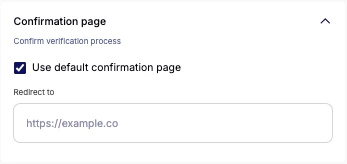
Once a user completes verification, what do they see? You can customize the success message, for example, “Welcome aboard!” or a pending message like, “We’re reviewing your docs, hang tight!” Clear messaging here keeps users informed and confident in your process.
The Cost Breakdown

As you add verification steps (e.g, a Liveness check + a NIN lookup), the dashboard shows a real-time cost breakdown. This means you’ll know exactly how much each successful onboarding costs your business before going live, helping you plan your budget and scale confidently.
Integrating Your Flow: The Final Step
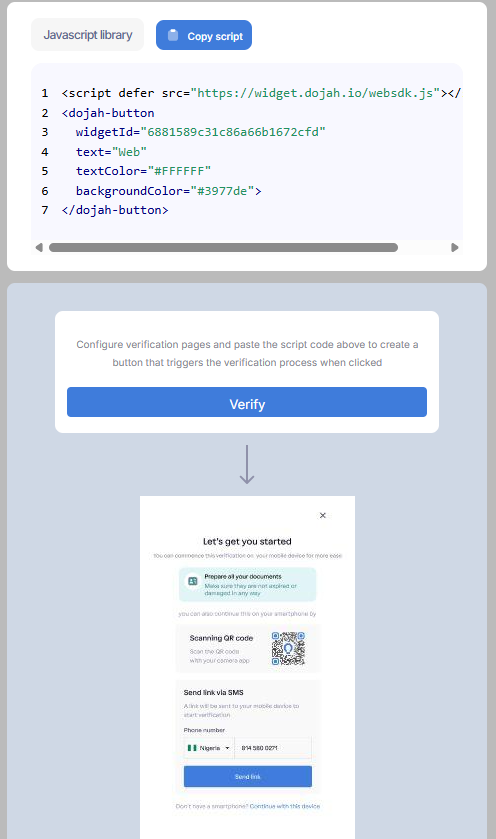
Once you hit "Publish," you have three ways to get this in front of users: the flow link, the web SDK, and the mobile SDK. While the Web and Mobile SDKs are low-code options, the flow link requires no knowledge of writing code at all. Here is how it works:
Flow Link (The No-Code Solution)
This is the zero-code option. Dojah generates a unique URL (e.g., https://onboard.dojah.io/verify/your-unique-flow-id).
- You can paste this link into a WhatsApp message.
- You can send it via Email.
- You can put it in your Instagram Bio.
When a user clicks it, they go through the entire flow in their browser, and you get the results on your dashboard. It’s that simple.
Seeing Your Verifications on the Dashboard
Once users start onboarding, you’ll see them pop up in the "Verifications" tab.
- Status Indicators: Instantly see who passed, who failed, and who is pending.
- Deep Dive: Click on a user to see their uploaded ID, their liveness selfie, and their AML risk score.
- PDF Reports: You can download a full, professional PDF report of any verification to keep for your compliance audits.
Some Tips and Important Guides
- Start in the Sandbox: Always test your flow in "Sandbox Mode" first. It’s free and lets you see the user experience without spending a dime.
- Monitor Abandonment: Check the analytics to see where users "drop off." If 50% of people quit on the "Signature" page, maybe you should make it optional!
- Keep Branding Consistent: Use your brand colors. It significantly increases the completion rate because it feels safer to the user.
You now have everything you need to go from zero to a secure KYC onboarding flow without a single line of code required.
Build Your KYC Flow with Dojah in Minutes
Getting started with Dojah is fast and straightforward. Create your free Dojah account, then use the EasyOnboard visual editor to build your first verification flow. Arrange the pages and verification steps exactly how you want, generate a Flow Link, and test it on your own device. In just a few clicks, your business is ready to onboard users seamlessly and securely.
If you’d like a live walkthrough, guidance on best practices, or support fine-tuning your flow, our team is ready to help.
Book a demo today and see how Dojah can make identity verification effortless for your business and a smooth experience for your users.
Start using Dojah for all your business needs


